-1.png?width=300&height=51&name=FastJobs%20FastGig%20Logo%20(1)-1.png)
If you are taking a break from the job hunt or no longer wish to use your FastJobs account, you can easily request to delete your account directly through the app. We are sad to see you go, but we make managing your data privacy straightforward.
Steps to delete your FastJobs account
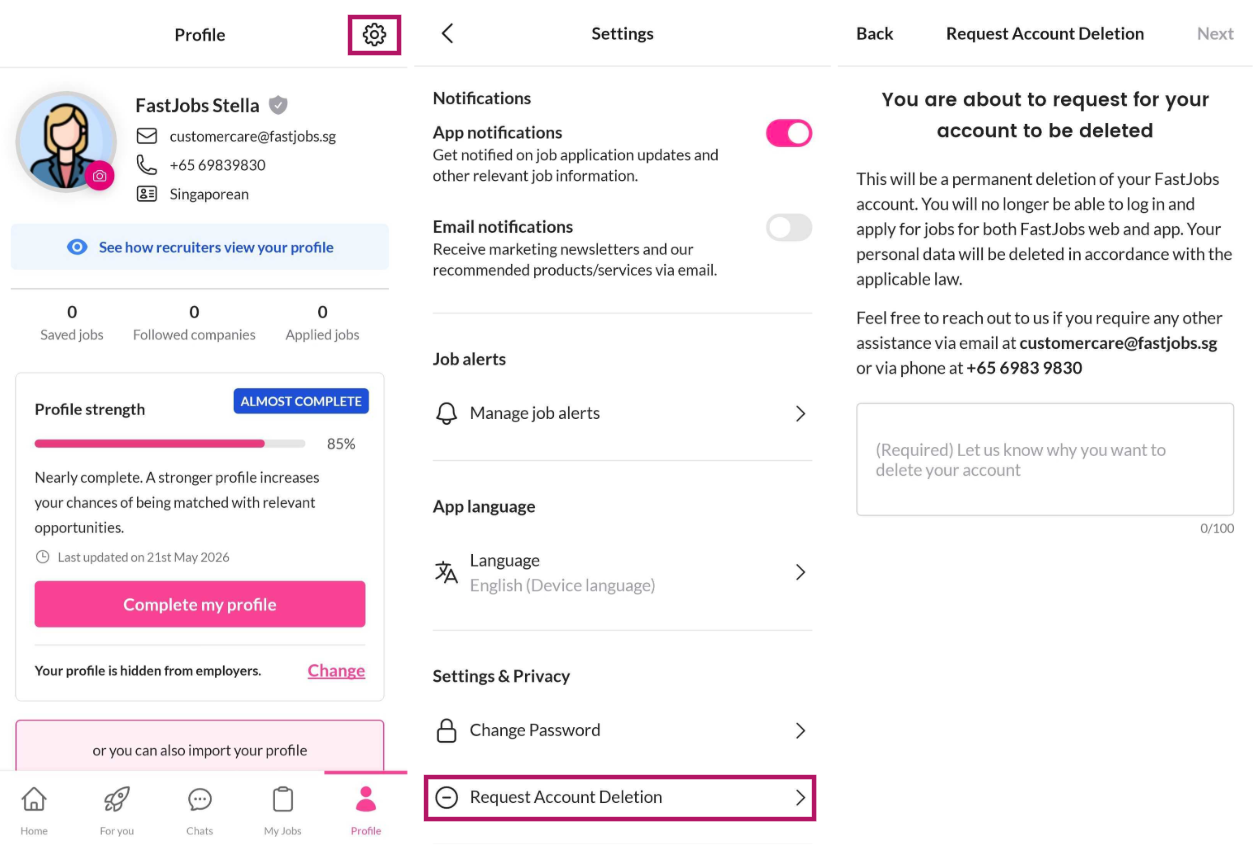
- Open the FastJobs app on your mobile device.
- Tap on your Profile icon (located in the top-right corner of your dashboard).
- Select [Settings] from the menu.
- Under the Settings & Privacy section, tap on [Request Account Deletion].
- Read through the on-screen information explaining what happens to your profile data, and let us know why you're leaving if you'd like—your feedback is incredibly valuable and helps us improve our platform for everyone!
⚠️ Important: What happens after deletion?
Once your request is submitted and processed, your personal data will be permanently removed in strict compliance with our privacy policy.
- You will immediately lose access to your account profile, resume, and saved job preferences.
- Your historical job applications will be permanently closed, and you will no longer receive status updates from employers.
- This action cannot be undone. If you choose to return to FastJobs in the future, you will need to register a brand-new account from scratch.
What's next?
Are you looking to delete your account because an employer's messages or offers seem a bit suspicious? Your safety is our absolute highest priority, and you don’t have to go through it alone.
Before you close your profile, please read our crucial safety guide on [I think a potential scammer has contacted me. What can I do? What should I look out for?] to learn how to spot red flags, protect your personal information, and report suspicious accounts immediately!
%20(1).png?width=670&height=215&name=image%20(42)%20(1).png)