-1.png?width=300&height=51&name=FastJobs%20FastGig%20Logo%20(1)-1.png)
Accidentally swiped away an alert, or want to double-check a message we sent you earlier? Missing out on job application updates, urgent hiring announcements, or market insights can be frustrating. Thankfully, tracking down your past alerts is incredibly simple!
Here is how you can re-read them directly in the app:
- Look at the top right-hand corner of your Home dashboard.
- Find the [Bell Icon] 🔔 and simply tap on it to view your complete history!
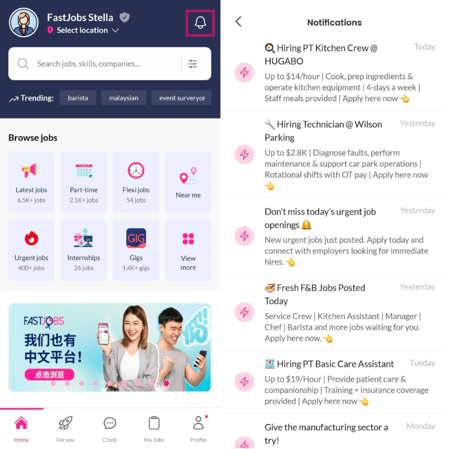
Please note: To keep your app running smoothly, your notifications will be automatically removed 30 days after they are received. Be sure to check your inbox regularly so you don't miss out on important employer updates!
What's next?
Did your notification alert say an employer sent you a direct message, but you can't seem to reply to them? If you clicked a chat alert only to find your message thread locked or frozen, there is usually a very specific reason for it.
Head over to our troubleshooting guide on [My FastChat Conversation Cannot Be Resumed. What Happened?] to find out why chats close and how you can reconnect with hiring managers!
%20(1).png?width=670&height=215&name=image%20(42)%20(1).png)