To give you better visibility and control over your coin usage, all coin purchases on FastJobs are managed through Coins Wallet.
Whether you're checking active balances, reviewing validity dates, or tracking past purchases, your dashboard provides complete transparency into your company's credit history.
Key Features of Coin Lots
- Lot-Based Expiry: Every coin package purchased creates its own unique "Lot" with a dedicated expiry date based on your contract terms.
- Automatic Usage (First In, First Out): When you post jobs or use premium features, the system automatically spends coins from your earliest expiring lot first.
- Dedicated Subaccount Wallets: Subaccounts enjoy full control over their own balances. Whether buying packages directly or receiving coins from the main account, every lot keeps its original expiry date.
How to Check Your Coins Wallet & Purchase History
You can monitor your balances, active lots, and order receipts directly under Reports on the left-hand menu:
-
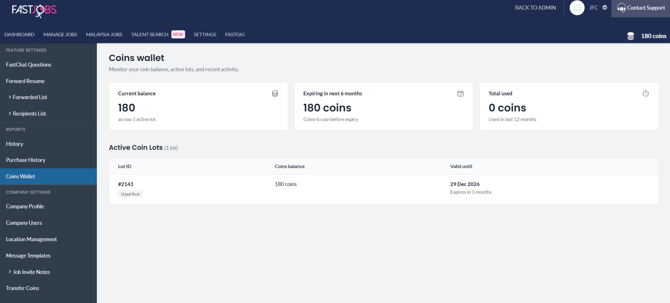
Coins Wallet:
- Go to [Settings] > [Coins Wallet].
- Here, you can track your total Current balance, coins Expiring in next 6 months, Total used in the last 12 months, and a full list of Active Coin Lots (including Lot IDs, balances, and exact valid-until dates).
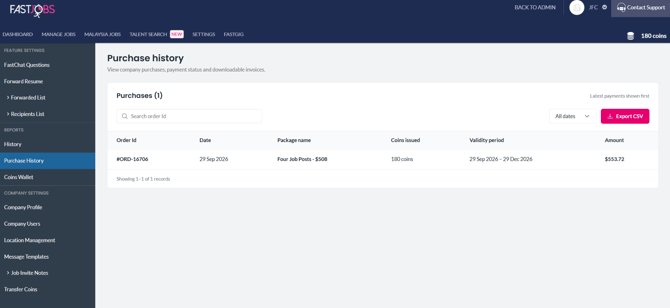
- Purchase History:
- Go to [Settings] > [Purchase History]
What's next?
Need to share credit balances across different department accounts or sub-entities? Head over to [How Can I Transfer Coins Between Company Accounts?] to learn how to move coins seamlessly.