-1.png?width=300&height=51&name=FastJobs%20FastGig%20Logo%20(1)-1.png)
Hiring is a team sport! If you need to give your teammates access to your FastJobs employer account so they can help manage candidates or post openings, just follow these simple steps.
Step 1: Head to your settings
Go to your Employer Dashboard, then navigate to: [Settings] → [Company Users]. Please note that you must be an Organisation Admin or Company Admin to invite users!
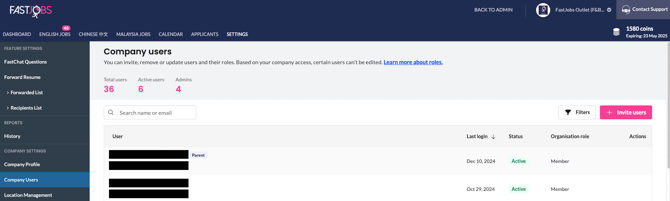
Step 2: Add the user’s details
- Enter the email address of the user
- Choose their organisation role
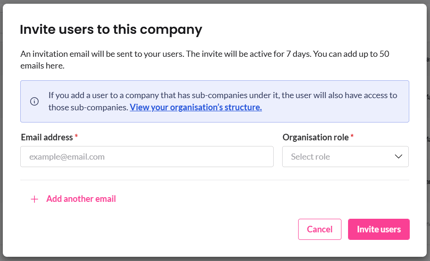
You can now also update or edit an existing user’s information if you’re an Organisation Admin or Company Admin — giving you more control over your team’s access and details. Just head over to [Settings] from your Dashboard and choose which user you want to edit.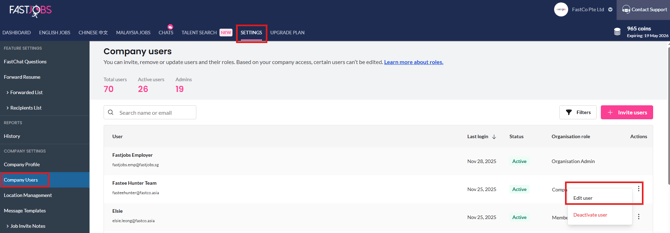
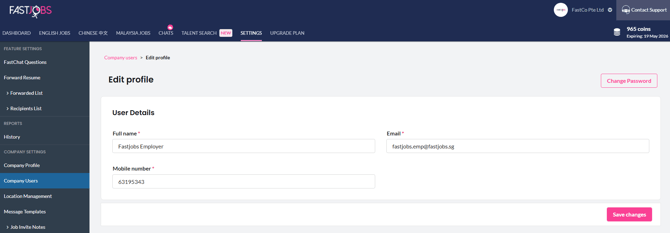
Step 3: Send the invite
Click [Invite Users] — and you're done! An activation email will be sent to the new user from noreply@fastjobs.sg.
Note: If your teammate doesn't see the email within a few minutes, remind them to give their spam or promotions folder a quick check!
What's next?
Not quite sure which access level to give your new teammate? Check out our breakdown of [What are the different roles and their permissions?] to make sure everyone has the right tools for the job!
%20(1).png?width=670&height=215&name=image%20(42)%20(1).png)