-1.png?width=300&height=51&name=FastJobs%20FastGig%20Logo%20(1)-1.png)
Standing out on FastJobs is easy with our profile completion tool! Just fill in your details across the key categories (Basic Information, Work Experience, Education, etc.) and watch your percentage grow. The closer you get to 100%, the better your rating becomes, making it easier than ever for the right employers to find you.
Why Completing Your Profile Matters
A complete profile helps you:
- Get noticed by employers
- Receive more relevant job matches
- Increase your chances of getting job invitations
Take a few minutes to complete your profile and make the most of your FastJobs experience!
Part 1: Verification and Basic Information
Get verified in three easy steps: link your email, mobile number, and Singpass. A verified profile increases your credibility and helps you stand out to recruiters!
Next, start by updating your personal details, such as:
- Gender
- Employment status
- Phone number
- Birthday
- Highest education level
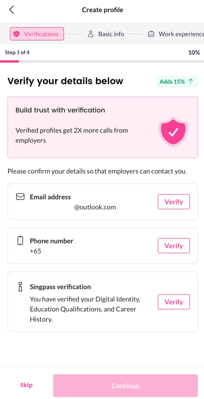
💡 Tip: Keeping this information up to date helps employers quickly understand your background.
About Singpass Verification
When you verify your profile using Singpass, we securely collect:
-
Residency information
-
Career and Skills Passport (CSP) data
This helps speed up your profile setup and improves trust with employers.
You’re always in control of what gets added to your FastJobs profile:
-
You can choose which past job experiences to import from CSP — or choose not to import any at all.
-
Before anything is added, you’ll be asked to review and edit the information, including filling in any missing details.
-
Only the information you confirm will be saved to your profile.
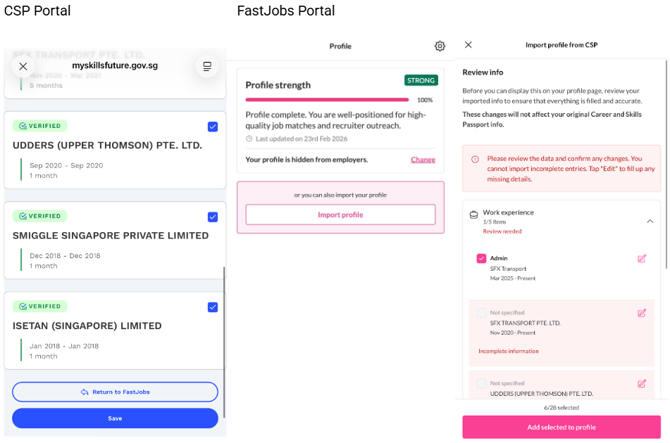
This ensures your profile stays accurate and reflects only what you want employers to see.
Part 2: Work Experience & Job Preferences
This section helps employers quickly understand your experience level and the exact type of role you are looking for.
-
Work Experience: Share your previous background by listing your past job titles, company names, employment duration, current status, and key responsibilities. If you are a fresh graduate or new to the workforce, simply select “No work experience / Fresh graduate.”
-
Select Job Type: Choose your preferred work arrangement, such as Part Time, Full Time, Contract, or Internship.
-
Select Job Level: Indicate the target seniority level you are aiming for (e.g., Intern, Entry level, Junior executive, Supervisor, Non-executive, Senior executive, Manager, or Head).
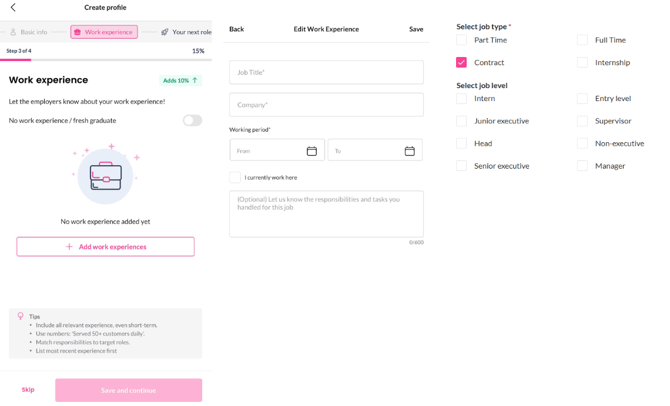
Setting these preferences ensures hiring managers can match you directly with opportunities that fit your career goals!
Part 3: Skills & Background
This section completes your profile and helps employers better assess your suitability for roles.
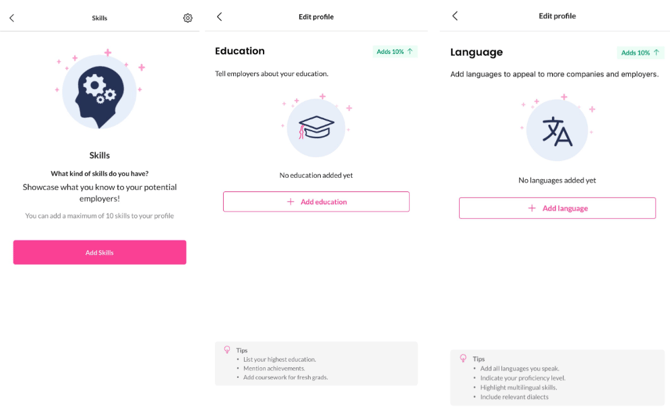
Add details that help employers better understand your qualifications:
-
Relevant skills
-
Education history
-
Languages you can speak or write
You may also add any relevant certificates or licences. This section is optional but can help strengthen your profile for certain roles.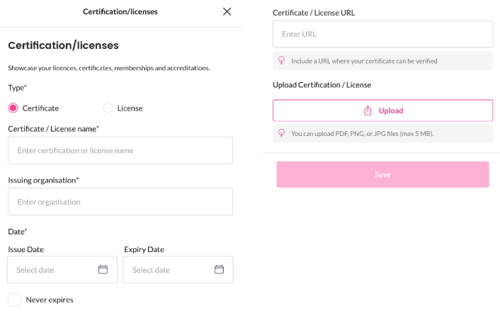
What's next?
Now that your profile is polished, complete, and sitting at 100%, you are officially ready to stand out! Don't let that amazing profile sit idle—it's time to put it to work and land your next role.
Head right over to our simple walkthrough on [How Do I Apply for Jobs on FastJobs?] to learn how you can submit your winning profile to top employers with just a single tap!