-1.png?width=300&height=51&name=FastJobs%20FastGig%20Logo%20(1)-1.png)
Need to hire fast? The Urgent Tag gives your job post an instant boost so it gets noticed by the right candidates, faster.
What does the Urgent tag do?
Think of it as a quick visibility boost for time-sensitive roles. When you add the Urgent tag, your job will:
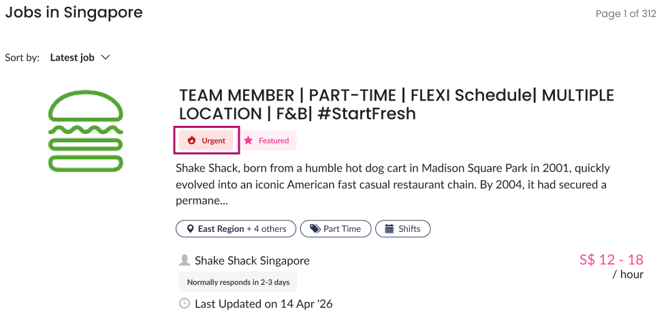
- Show an “Urgent” badge that grabs attention
- Get priority placement in search results
- Be pushed through targeted alerts to matching candidates
- Enjoy a 3-day boost to drive faster applications
When should I use it?
Use the Urgent tag when speed matters:
- You need to fill a role ASAP
- Applications are slower than expected
- The role is last-minute or time-sensitive
- You want to amplify a Featured job posting
How do I add the Urgent tag?
It only takes a few clicks:
For new job postings:
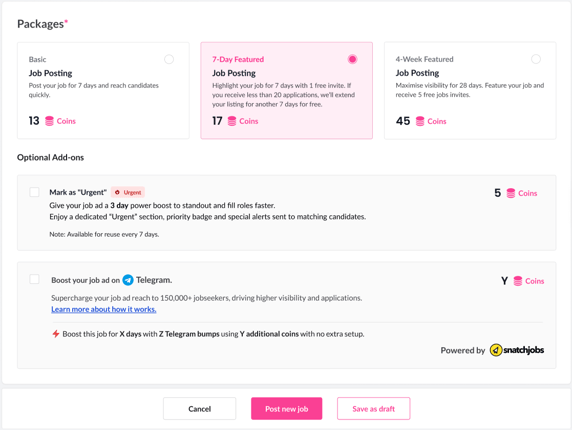
- Create your job ad
- Tick “Mark as Urgent” under Optional Add-ons
- Review the coin cost and duration at checkout
Recruitment Agencies = 12 coins
Direct Employers = 5 coins - Confirm and post
For existing job postings:
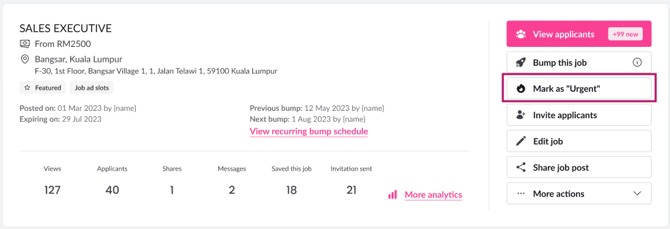
- Head to your active jobs
- Click “Mark as Urgent” on the right side
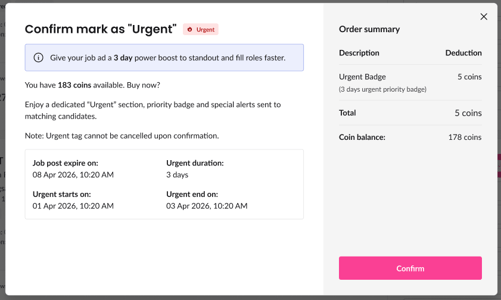
- Check the coin deduction and duration
- Confirm to activate
If you’re trying to hire quickly, this is the easiest way to give your job the extra push it needs!
What's next?
Want to speed up your hiring timeline even more? While the Urgent Job Tag is fantastic for making active job seekers rush to apply, you don't have to just sit back and wait.
Check out our guide on [Finding the Right Candidates with Talent Search] to learn how you can actively dive into our verified database and pitch your urgent roles directly to top talent!