-1.png?width=300&height=51&name=FastJobs%20FastGig%20Logo%20(1)-1.png)
To make teamwork a breeze, FastJobs offers different access levels based on your role in the organization. This helps ensure everyone on your hiring team has exactly the tools they need to find great talent.
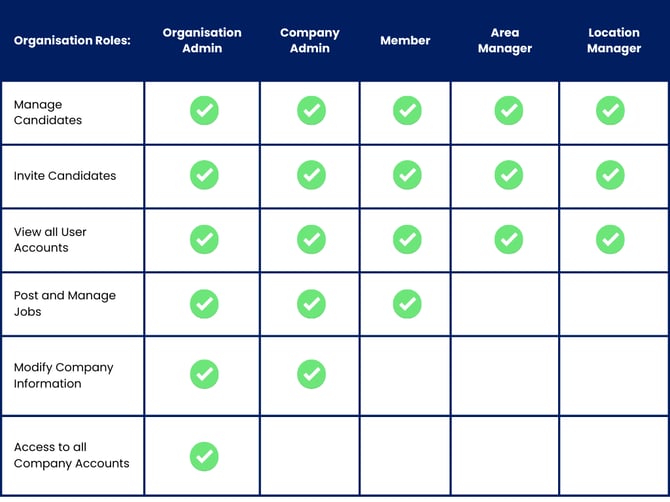
Role Breakdown
- Organisation Admin
You’re the super admin! You have ultimate control over everything—from posting jobs and managing candidates to overseeing every single user account across the entire organization. - Company Admin
You manage your specific company and any related branches or sub-accounts. Think of it as having the same powers as an Organisation Admin, but focused entirely within your specific company’s ecosystem. - Member
The perfect role for standard hiring managers and recruiters. You can easily post jobs, manage candidates, and view the list of team members within your company. - Area & Location Manager
Designed specifically for overseeing particular outlets or regions. In this role, you can post and manage jobs for your assigned areas, as well as view user accounts within those specific locations.
Note: The Area and Location roles are part of our special Outlets Management feature. If you'd like to enable this for your account, just give your friendly Account Manager a shout!
What's next?
Ready to bring your teammates on board and assign them their roles? Take a look at our step-by-step guide on [How to add users to your company account] to get your team set up in minutes!
%20(1).png?width=670&height=215&name=image%20(42)%20(1).png)